The Visual Engine of Your Stream: A Guide to Twitch Panels, Overlays, and Alerts
When you tune into a live stream on Twitch, you're not just watching someone play a game. You are entering a digital broadcast studio. For professional cybersport streamers and aspiring creators, this studio needs to be well-designed, functional, and engaging. The visual elements—the panels lining the bottom of the screen, the graphics framing the gameplay, the sudden celebratory animations—are not mere decoration. They are the critical interface between the streamer and their community. This article explores the core components of that interface: Twitch panels, gaming overlays, alerts, and facecam integration, explaining their purpose, significance, and how they combine to create a professional and captivating streaming environment.
The Foundation: Understanding Twitch Panels
Twitch panels are the rectangular information boxes found on a channel's "About" page beneath the video player. They are the static, yet vital, backbone of a streamer's online home. Think of them as the signage and information desks in your studio.
Their primary purpose is communication and organization. Unlike the dynamic live video, panels provide persistent information viewers can access anytime. A common misunderstanding is that they are only for listing social links. While that is a key function, their role is far broader.
- Channel Rules and Guidelines: Setting community expectations.
- Schedule: Letting viewers know when you'll be live.
- Sponsors and Affiliations: Professionally showcasing partnerships.
- FAQ: Answering common questions about your setup or gameplay.
- Goals and Milestones: Tracking subscriber counts or charity drives.
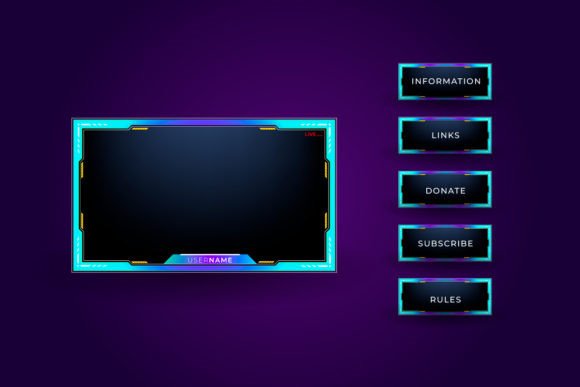
A Gradient Twitch Panels Set, for example, refers to a cohesive collection of these panels designed with smooth color transitions. This isn't just about aesthetics. A unified, thematic set builds brand identity. It signals professionalism and attention to detail, making your channel memorable and visually trustworthy. For a viewer, especially a new one, clean and clear panels make the channel feel welcoming and easy to navigate.
The Dynamic Layer: Gaming Overlays and Facecam Integration
While panels are for the "About" page, overlays are the graphics that appear on top of the live broadcast itself. This is the dynamic visual layer during gameplay. A gaming overlay typically includes:
- A border or frame around the game footage.
- Designated areas for the facecam (webcam feed).
- Sections for displaying recent followers, current subscribers, or chat highlights.
- Sponsor logos or event branding integrated into the layout.
The overlay's job is to enhance the viewing experience without obstructing the content. A well-designed overlay for a cybersport streamer might subtly frame the intense action of a competitive match, while allocating a clear, crisp space for the facecam. The facecam is crucial—it humanizes the stream. Seeing the streamer's reactions, their focus, and their excitement builds empathy and connection, turning a solo gameplay session into a shared experience.
The practical relevance here is immense. In the crowded space of streaming, a clean, custom overlay distinguishes your channel. It tells viewers you've invested in your craft. It also serves a functional purpose by structuring information on-screen, ensuring the gameplay remains the star while supplementary details are elegantly presented.
Common Misunderstanding: Overlays Aren't Just "Fluff"
Some assume overlays are distracting or unnecessary. However, for a cybersport context, they can be tactical. A minimalist overlay might display vital statistics like tournament standings or personal goals during the match, adding narrative depth. The key is balance. A busy, cluttered overlay can indeed harm the experience, but a thoughtfully designed one elevates it.
The Interactive Spark: Alerts and Buttons
This is where the stream becomes interactive and celebratory. Alerts are the animated notifications that pop up on screen during a live stream in response to specific viewer actions.
- Follow Alerts: Welcome a new follower.
- Subscription Alerts: Celebrate a viewer subscribing.
- Donation/Cheer Alerts: Thank a viewer for financial support.
- Host Alerts: Recognize another channel hosting your stream.
These are more than just notifications; they are community engagement tools. A unique, playful alert animation—like a character from the game doing a celebratory dance—creates a moment of shared joy. It acknowledges the viewer's support publicly, making them feel valued and encouraging others to participate. The sound and visual design of an alert should match your channel's overall theme, creating a cohesive sensory experience.
"Buttons" in this context often refer to interactive elements within the streaming software or on companion apps that trigger these alerts or other actions, like switching scenes. For the viewer, they are mostly unseen, but for the streamer, they are the control panel for managing the live show's interactive elements.
Synthesizing the Visual Studio: How Everything Fits Together
Imagine a professional cybersport streamer preparing for a tournament broadcast.
- Their Twitch Panels are updated with the tournament schedule, participating team info, and any special rules for chat during the event. A gradient set gives this information a sleek, professional backdrop.
- Their Gaming Overlay is activated. It frames the gameplay with tournament branding, has a dedicated, well-lit space for their focused facecam, and includes a dynamic area showing the match score.
- As viewers tune in, Follow and Subscription Alerts with a themed animation (perhaps the tournament trophy spinning) fire off, building hype and acknowledging the growing audience.
This synthesis transforms a simple game broadcast into a structured, engaging television-like production. It fits into modern digital entertainment and content creation as essential branding and community management. For a streamer, this visual suite is as important as their gaming skill or commentary—it's the production quality that can attract and retain an audience.
Building Your Broadcast: Practical Considerations
For beginners, the journey doesn't require immense expense. Many start with free, customizable templates for panels and overlays. The key principles are:
- Cohesion: Ensure your panels, overlay, and alerts share a color scheme, font style, or thematic element. This builds your visual brand.
- Clarity: Information in panels and on overlays must be easy to read and understand quickly.
- Balance: Never let visuals overwhelm the core content: the game and your personality.
- Engagement: Use alerts to actively reward and recognize viewer participation.
For experienced streamers, investing in custom-designed sets or learning advanced broadcasting software to create unique interactive elements can be the next step in channel growth. The technology continually evolves, offering more integration with chat, real-time stats, and interactive games for viewers.
The Significance Beyond Aesthetics
Ultimately, these tools serve a deeper purpose than just looking good. They:
- Establish Professionalism: They signal that you take streaming seriously, which can attract partnerships and sponsorships.
- Facilitate Communication: They efficiently convey necessary information to a diverse, global audience.
- Foster Community: Through interactive alerts and a welcoming design, they help build a loyal, active viewer base.
- Enhance Narrative: They can add layers of story and data to the raw gameplay, enriching the viewer's understanding and enjoyment.
In conclusion, the Gradient Twitch Panels Set, the gaming overlay, the alerts, and the facecam are not isolated cosmetic choices. They are interconnected components of a stream's visual identity and functional design. From the static information panels to the dynamic celebratory alerts, each element plays a role in transforming a personal gameplay session into a professional, engaging broadcast. By understanding and thoughtfully implementing these tools, streamers of all levels can build a stronger, more attractive, and more connected channel—the true visual engine of their digital studio.